Wednesday, November 16, 2016

Instruction with Social Media: Engaging, Efficient, and Effective


According to Mourlam (2013), social media facilitates communication between individuals and groups and allows for the sharing of updates, resources and other information. In the classroom, these traits can be very helpful with making learning more engaging, efficient, and effective.

After using other learning management systems with social media capabilities, I started using Google Classroom this year in my English and creative writing classes. While the platform allows student interaction through posts and comments, the question feature allows for content-focused interaction. The image below is a screenshot of a question with responses that I posted in my English classes with the analysis of the Emily Dickinson poem, “This is My Letter to the World.”

IMG_3210.jpg

In relation to engaging instruction and to the MAPS heuristic of Hicks (2013), this mode and medium requires each student to engage in the content by responding to the question with text-based evidence.  For my purpose of assessing the students’ mastery of inferring main idea, I did not want them to see and be able to respond to each other’s individual responses. I wanted each student response to be valid and not a duplicate. However, once all students had responded and I had quickly reviewed them, I displayed the responses on the projection screen and led a class discussion.

Although my structured use of the question feature was due to my student audience and the situation of having several low-level readers, I could use this question feature in a more engaging manner by making the student responses viewable by other students and by allowing responses to each other. This interaction would better engage the students, and therefore, they would be more likely to master the skill, which is the primary purpose of the activity and interaction, an emphasis in the MAPS heuristic of Hicks (2013). In addition to the technological improvements, I could also improve my wording of the question, which I believe would prevent some of the wording errors in the responses.

Regardless of the delivery choices for a question in Google Classroom, it is an ideal example of how social media can be more engaging with the interactions. Nonetheless, it is also an example of how social media can be used within a few minutes to assess student mastery when traditional pencil and paper assignments can take much more time for students to submit and for teachers to evaluate. This efficiency ultimately leads to better effectiveness.

The following link includes many resources concerning Google Classroom: http://alicekeeler.com/google-classroom/


References

Hicks, T. (2013). Crafting digital writing: Composing texts across media and genres. Portsmouth, NH: Heinemann.
Mourlam, D. (2013). Social media and education: Perceptions and need for support. Journal on School Educational Technology, 9(3), 23-28.

Wednesday, November 2, 2016

Crafting and Revising a Video Text

With my course introduction video, I felt very deficient in my demonstration of crafting video texts as I reviewed the relevant criteria for creating such a text from Hicks (2013). While he outlines many characteristics and their effects on a video text, I felt as if I was barely skimming the surface even as I addressed some critical elements in my video.


Before addressing specific elements, I addressed the MAPS heuristic of Hicks (2013) and identified my mode, media, audience, purpose, and situation. I determined the mode for my course introduction video as being a biographical and informational text with a purpose of introducing myself to my classmates in the course. Although I did not put much thought into the format of my original video, I reconsidered my choices in relation to the craft of the video with these parameters in mind. 

Image http://hickstro.org/wp-content/uploads/2014/04/Slide1.jpg

I decided on enhancing the presentation and flow of my video through the WeVideo application. In addition to recapturing my video, I added captions and text to enhance my message as suggested by Hicks (2013). By adding a title and captions, I made my purpose more evident to the audience and provided a smooth flow to the overall video. My final quote at the end also emphasizes a meaningful theme and message from my video. Additionally, I added transitions that give a smooth fade-in at the beginning and a fade-out at the end with transitions of vertical flips between each topic in my video. These transitions also make the video more appealing and provide better flow so that the audience is not overwhelmed by a monotonous video with no variety or road signs for the video text.
As I indicate in my video, I want to apply my new knowledge of technology resources and strategies to my classroom in order to make my curriculum more relevant to my students. In English Language Arts, I can definitely see how the intentionality of creating and analyzing video texts clearly relates to multiple standards. Being a teacher of high-need students of poverty, I recognize the conclusion of Friesem (2014) that video production provides a way for these students to share their ideas through a medium and collaborative process that is not possible through traditional texts and assignments.

The following video displays many of the video text elements as outlined by Hicks (2013):


References

Hicks, T. (2013). Crafting digital writing: Composing texts across media and genres. Portsmouth, NH: Heinemann.
Friesem, E. (2014). A story of conflict and collaboration: Media literacy, video production, and disadvantaged youth. Journal of Media Literacy Education, 6(1), 44-55.

Wednesday, October 12, 2016

Interactive Posters: Concise and Relevant


With so many different presentation tools, choosing the most effective one to meet your purpose can be difficult.  Furthermore, the traditional slide presentation has become the norm and often just enables a boring teacher or speaker because of the presenter not utilizing the full capabilities of slide presentation applications or simply providing spoken material word-for-word in the slide presentation.  In order to not overwhelm an audience with too much content and to focus on the most relevant information, interactive posters have become an effective presentation tool in many situations.

Image result for characteristics of effective visual presentations


As a teacher, I have recognized the struggle to capture the attention of the younger generation for significant amounts of time.  Personally, I have never utilized PowerPoint presentations very often, if ever, for providing instruction and course content.  I also have not frequently assigned students projects to be completed or visually enhanced through PowerPoint presentations due to their common use by so many teachers.  The interactive poster provides a less common and a more concise way of presenting information to students and for students to create products that assist in presenting constructed and/or researched material.


In the above example of an interactive poster, I have included some different online examples and my own student examples from a creative writing nonfiction project.  Hicks (2013) highlights several characteristics of effective presentations that could also apply to interactive posters, such as simplicity, unpredictability, relevancy, credibility, and storytelling.  These examples included above are not perfect exemplars, but they all display some of these characteristics.  The Civil War poster is very complex, but it does tell an unpredictable story with credible and relevant resources that engage the audience much more than a slide presentation.  The other three examples may need improvement in flow from one component to another or maybe more concise bits of text, but they provide relevant and credible examples through different forms of media in a concise format in relation to the traditional slide presentation.


I truly believe with the shift to each viewer having his or her own device that the slide presentation will be replaced with interactive posters and similar media for visually enhancing presented material.  Buttery (2008) notes that students who are easily distracted have difficulty completing tasks and focusing for long periods of time.  However, interactive posters and similar media allow students with these common challenges to engage in meaningful material in a manner that is much less monotonous as many slide presentations.  The concise format allows for the viewer to access the different components of the presentation more easily and in a more engaging manner than with clicking through numerous slides.


References

Hicks, T. (2013). Crafting digital writing: Composing texts across media and genres. Portsmouth, NH: Heinemann.
Buttery, T. J. (2008). Understanding and working with Attention Deficit Disorder students. Southeastern Regional Association of Teacher Educators Journal, 18(1), 7-15.


Wednesday, September 21, 2016

Visual Literacy in Digital Writing Instruction

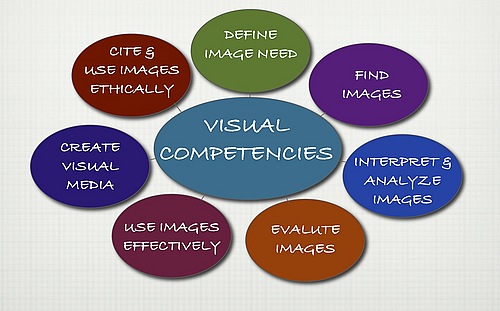
Visual features are important to the craft of almost any text in our current and future world. Visuals are a significant part of the students’ lives today and for their careers in the future. Palmer and Matthews (2015) note that many jobs in science, social science, and health fields require workers to interpret information from various types of images. Therefore, visuals must be a crucial part of instruction and digital writing in today’s classrooms. However, as Hicks (2013) points out, “visual literacy” should allow for educators to teach students how to purposefully choose and/or create visuals that provide a deeper meaning for texts (p. 15).


Since students’ lives are shaped by visuals from television, gaming, phones, tablets, and many other devices, instruction and student-constructed products must utilize visuals to engage students and to make tasks more meaningful.  For secondary students, a traditional essay or research project can be much more engaging and meaningful with technology and visuals.  In addition to adapting the media for publishing such assignments, images reflecting the topic or theme or a chart or diagram providing more specifics in an organized and visually appealing manner helps the student writer display a deeper understanding of the topic. These visuals also help the student’s audience better understand the topic. The images provide learning connections for the writer and the reader and can enrich learning for all students involved.


Retrieved from https://apps.carleton.edu/reason_package/reason_4.0/www/images/912243.jpg.


As an English teacher, I am unfortunately aware of my own deficiencies and those of others in relation to teaching students the appropriate and effective strategies for including visuals with written texts. As Hicks (2013) defines the elements associated with the “craft of writing,” educators must instruct and model for students how to choose or construct visuals and how to appropriately cite sources for images produced by others (p. 16). Just as teachers teach the concepts of diction and tone and how they enhance the writer’s overall purpose, teachers must also teach how visual components, such as background, size, shape, color, and tone, also enhance a writer’s overall purpose within a text.

Additionally, teachers must teach students how to correctly cite sources for images in a similar way to citing sources for written text.  The following link includes source documentation for visuals in MLA format, the commonly used style in secondary schools:


In the world of education, we must adapt writing instruction to meet the technological and visual needs of our students and of the world in which they live, play, and will ultimately work.  


References

Hicks, T. (2013). Crafting digital writing: Composing texts across media and genres. Portsmouth, NH: Heinemann.
Palmer, M. S., & Matthews, T. (2014). Learning to see the infinite: Measuring visual literacy skills in a 1st-year seminar course. Journal of the Scholarship of Teaching and Learning, 15(1), 1.